

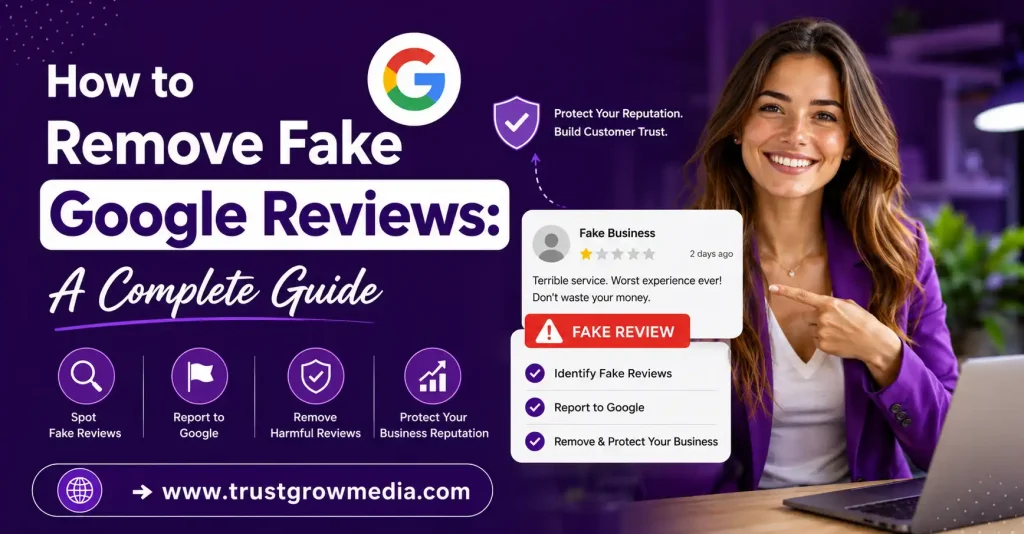
Learn how to remove fake Google reviews with our step-by-step guide. Protect your business reputation and ensure authentic feedback today!
Key Highlights
- Fake Google reviews can damage your Google Business Profile, overall rating, and customer reviews quickly.
- You can report a suspicious review through Google Maps or your Google Business Profile dashboard.
- Google looks at content policies, policy violations, and signs of fake accounts or conflicts of interest.
- Clear evidence, such as screenshots of the reviews and a booking system check, strengthens your removal request.
- If removal is delayed, use Google support and the reviews management tool to track progress.
- A calm public reply and more genuine reviews help protect your online reputation.
Introduction
Fake Google reviews can damage your reputation, reduce customer trust, and negatively impact your local search rankings. While removing fraudulent reviews isn’t always straightforward, understanding Google’s policies and the proper reporting process can improve your chances of success. This guide explains how to identify fake reviews, report them effectively, and protect your business from future attacks. For more trusted reputation management insights, TrustGroowMedia provides expert guidance for businesses worldwide.
Understanding Fake Google Reviews
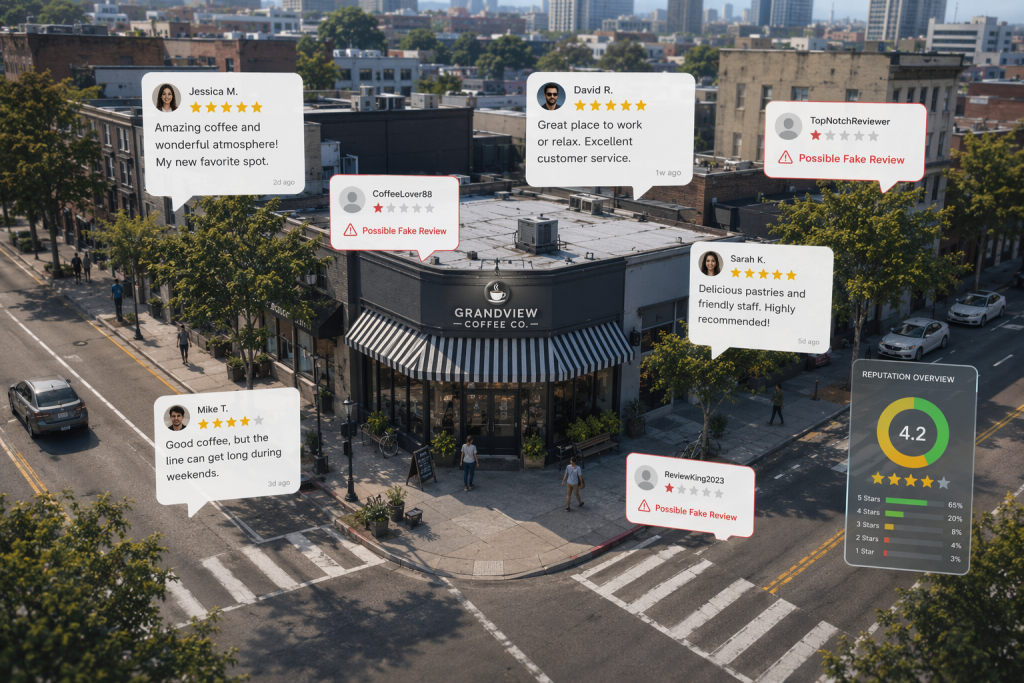
A fake review is a Google review that does not reflect a real customer experience. It may be written to harm a business, boost one unfairly, or create a false impression. Some fake reviews are positive. Others are clearly meant to hurt.
Google reviews are supposed to follow content policies. When a review breaks those rules through spam, fake engagement, harassment, or a conflict of interest, it may qualify for removal. Before you report anything, it helps to understand the common forms these reviews take and why they matter.
Types of Fake Reviews Commonly Seen
Fake Google reviews usually fall into a few clear patterns. Some are written to inflate a star rating. Others are posted to drag down a competitor. You may also see a coordinated attack, where several reviews appear close together from new accounts with little profile history.
Watch for these common types:
- Fake positive reviews posted by friends, family, employees, or paid services
- Fake negative reviews left by competitors, former employees, or scammers
- Review bursts from fake accounts or new accounts in a short time
- Repetitive comments that look copied, generic, or automated
If you are asking how to tell whether a review violates Google’s policies, start with authenticity. Does the review reflect a real visit, product, or service? If not, and the profile activity looks suspicious, there is a strong chance it crosses the line.
Why Fake Google Reviews Are Harmful for Businesses
Even one false review can create real problems. A fake post on your business profile may discourage potential customers, especially if they are comparing local businesses fast. Small businesses often feel this impact the most because each review carries more weight.
The harm usually shows up in a few ways:
- Negative reviews can lower trust and weaken your online presence
- False claims can push leads away before they contact you
- Repeated fake activity can create stress and consume time
The key question is not whether a review is harsh. Legitimate negative reviews can stay if they reflect a real bad experience. The problem begins when the reviewer was never a customer, uses fake accounts, or posts content that appears designed to manipulate your online reputation rather than share a genuine experience.
Potential Impact on Customer Trust and Local SEO
Fake reviews do more than annoy you. They can change how people see your Google Business Profile in seconds. A suspicious one-star comment or a cluster of misleading praise can distort your overall rating and shape customer trust before anyone clicks through.
They can also hurt local seo. Reviews influence visibility in search results, and false signals may reduce clicks, engagement, and confidence. If customers doubt what they read, they may choose another business without giving you a chance.
| Area affected | Possible impact |
| Customer trust | People may question whether your business is reliable or honest |
| Overall rating | A single false review can pull down your visible score |
| Search results | Lower trust and weaker engagement can affect local seo performance |
| Buying decisions | Potential customers may contact a competitor instead |
How to Identify Fake Google Reviews
Not every unhappy comment is a fake review. Some Google reviews are negative but still real, and those usually stay unless they break policy. Your job is to separate unfair feedback from review fraud.
Start by checking whether the reviewer matches any real interaction with your business name, records, or service history. Then look at the wording, timing, and profile behavior. When several red flags show up together, you may have a stronger case for reporting the review as suspicious.
Signs and Characteristics of a Fake Review
A fake review often looks off in small but important ways. The language may be extreme, vague, or strangely repetitive. The account may have no photo, no review history, or activity in very different locations within a short time.
Common red flags include:
- No record of the person in your system, invoices, or appointments
- Suspicious activity from fake accounts with very limited profile history
- Overly dramatic praise or complaints with no clear details
- Signs of conflict of interest, such as competitors or former employees posting
You do not need absolute proof before raising a concern, but patterns matter. If the review mentions nothing specific, comes from a brand-new profile, and does not match any real customer contact, that combination can suggest a policy issue rather than honest feedback.
Real vs. Fake Review Examples
The difference between real reviews and fake reviews often comes down to detail and credibility. Legitimate reviews usually mention a service, a date, a staff member, or a specific outcome. Even negative reviews tend to describe what actually happened.
Fake comments are usually broader. They may say only “terrible service” or “best” without context. They can also arrive in clusters, especially when new accounts are involved. That makes them easier to question.
| Real reviews | Fake reviews |
| Mention a real service, date, or team member | Stay vague and generic |
| Match a real customer or transaction | No record of the reviewer exists |
| Come in a natural pattern over time | Appear suddenly in a burst |
| Show balanced language, even when critical | Use exaggerated wording or copied phrases |
Violations of Google’s Review Policies
Google does not remove a Google review just because it is negative. It usually acts when there are policy violations tied to spam, fake engagement, harassment, off-topic content, or clear conflicts. That is why your report should focus on broken rules, not hurt feelings.
A review may violate Google policies if it involves:
- Spam or fake engagement from bots, paid posters, or copied content
- A conflict of interest from employees, former employees, or competitors
- Harassment, profanity, or attacks unrelated to a real transaction
When you review Google’s content guidelines, ask one simple question: does this comment reflect a real customer experience? If the answer appears to be no, and the post also breaks Google’s review policies, you have stronger grounds to report it for removal.
Preparing to Report a Fake Google Review
Before you file a report, take a moment to prepare. A fake review is easier to challenge when you can back up your claim with facts. Google business support is more likely to take your request seriously if your information is organized.
That means saving the review, checking your records, and identifying exactly why the post breaks policy. Good preparation also helps you avoid weak reports, emotional responses, or missing details that can slow the process. Next, here is what to gather.
Gathering Evidence and Documentation
Evidence matters because Google may not know your customer history. You do. If you are disputing a review, collect documents that show the person was never a customer or that the story does not match your records. Clear evidence gives your claim structure.
Useful items include:
- Screenshots of the reviews, reviewer profile, and timing
- A booking system check showing no matching appointment or transaction
- A record of your customer list, invoices, or communication history
Keep everything simple and factual. You do not need a long argument. What Google needs is a clear connection between the review and the policy problem. If there is no matching visit, service, or order, say that directly and support it with the records you already have.
What Information to Provide to Google
When you contact Google, focus on the essentials. Your goal is to make it easy for support to understand which review is in question, why it is suspicious, and how it connects to your business profile. Short, direct explanations work best.
Include details such as:
- Your business name and the specific review you are disputing
- The email address linked to your account and any case ID from earlier contact
- A brief statement explaining why the review appears fake or violates policy
If you have already flagged the review, mention that first submission too. Then attach supporting information, such as screenshots or customer record checks. This makes your removal request more complete and helps Google support review the issue without guessing what happened.
Avoiding Common Mistakes When Reporting
Many businesses hurt their own case by reacting too quickly. One of the biggest common mistakes is reporting legitimate negative feedback just because it feels unfair. Google support will not remove honest criticism unless it breaks policy.
Avoid these errors:
- Sending emotional complaints instead of factual explanations
- Reporting fake Google reviews without evidence or policy reasons
- Arguing publicly with the reviewer in an aggressive way
Another mistake is giving up after one attempt. Some cases need follow-up, especially when the first report is brief. Stay calm, stay organized, and keep your focus on policy violations. That approach gives you a better chance than blaming Google or treating every bad review as automatic fraud.
Step-by-Step Process to Remove Fake Google Reviews
Once you have your evidence ready, move through the process in order. Start with the basic report inside your Google Business Profile dashboard, then escalate if needed. This keeps your removal request tied to the official workflow.
You do not need to guess the next step. Google gives business owners a path: flag the review, choose the best reason, wait for review, and use the reviews management tool or support if the issue remains. Here is how each stage works.
Flagging and Reporting Fake Reviews via Google Business Profile
The first step is simple. Open your Google Business Profile in Google Search or Google Maps, find the review, click the three-dot menu, and choose the option to report it. This creates a flagged review for Google to examine.
Your basic process looks like this:
- Search for your listing in Google Maps or Google Search
- Open the reviews section and locate the suspicious post
- Click the menu and submit a report through google my business tools
After you send the report, Google reviews the content against its rules. This is the starting point for most cases. If the review clearly breaks policy, it may be removed. If not, or if nothing happens, you can move to support and the next reporting options.
Options for Reporting: Choosing the Right Reason
Choosing the right reason matters. If the issue is fake engagement, “spam” is often the best fit. If the review comes from a competitor or ex-staff member, conflict of interest may be closer. Match your report to Google’s content policies as closely as possible.
Ask yourself:
- Was this posted by someone who was never a customer? Choose the reason that best reflects spam or fake engagement
- Is it tied to a competitor, employee, or former employee? Point to conflict concerns
- Does it include threats, profanity, or personal attacks? Use the relevant abuse category
Review management tools can help you organize this process, but the key is accuracy. A vague or incorrect reason can weaken your case. Google’s review policies focus on the nature of the violation, so be precise when you report the issue.
Using Google Support and Review Management Tools
If standard flagging does not solve the problem, use Google support and the reviews management tool. These options let you escalate the issue, provide more context, and in some cases check the status of your report after the first action.
Helpful support paths include:
- Google support through business help options, live chat, or callback requests
- The reviews management tool for review status checks and appeals
- Reputation management tools that help monitor review activity and spot patterns early
Tools can support your workflow, but they do not replace evidence. If you have trouble removing a fake Google review, gather your screenshots, account details, and policy explanation before contacting support. That makes the conversation faster and more useful from the start.
What Happens After You Report a Fake Review
After you report a review, Google begins an internal check to see whether the content breaks policy. You usually will not get much detail during the initial response stage, so patience matters. In many cases, you need to check back manually.
The status of your report may change over several days. Some reviews disappear quickly. Others stay live while Google looks deeper or decides there was no clear violation. Knowing the usual timeline helps you plan your next move without guessing.
Google’s Review Removal Timeline
There is no guaranteed timeline for review removal. Some cases move in a few days, while others can stretch into weeks if Google needs more review. Your first submission is only the beginning, especially if the issue is not obvious from the review text alone.
Google support may not send a direct notice when a decision is made. That means you should monitor the listing and use available tools to see whether the review is still visible or whether a next step is needed.
| Stage | Typical expectation |
| First submission | Review is flagged through your profile |
| Early review period | About 3–7 business days in many cases |
| Extended check | Can take longer if more investigation is needed |
| Outcome | Review removed, no action taken, or appeal needed |
Appeals and Next Steps If Your Request Is Denied
Yes, Google can refuse a removal request. If that happens, do not panic. A denial does not always mean the review is legitimate. It may mean your evidence was too limited, the reason selected was weak, or Google did not see a clear violation on the first pass.
If your request is denied:
- Use the appeals process in the review tool when available
- Contact Google support directly with stronger documentation
- Continue monitoring the listing while you wait for the final decision
You usually get one solid chance to appeal, so make it count. Keep the explanation brief, attach proof, and point to the exact policy issue. If Google still says no, your best options are support, a calm public response, and long-term reputation work.
Legal Options for Permanent Removal
Legal action is a last resort, not the first move. It may make sense only when the review is clearly false, causes financial risk, and Google refuses to act after reporting and appeals. In those cases, legal counsel can help you assess your options.
Possible legal paths may include:
- Seeking legal services to send a formal notice
- Exploring a defamation claim if the statements are provably false
- Referencing broader enforcement trends around fake reviews, including the Federal Trade Commission focus
This route is usually best for severe cases, not routine complaints. It also works better if you can identify who posted the review and show measurable harm. For most businesses, reporting, appeals, and professional reputation management remain the most practical path before legal action.
Protecting Your Business Profile from Future Fake Reviews
Removing one bad post is helpful, but prevention matters too. A well-managed business profile is more resilient when fake google reviews appear. The goal is not perfect control. It is faster detection, stronger trust, and a healthier review mix.
That is where review monitoring, steady customer feedback, and reputation management tools help. If you keep an eye on new activity and encourage honest responses from real customers, suspicious posts have less power to define your brand. Two habits make the biggest difference.
Responding to Fake Reviews Publicly and Professionally
Yes, you can respond publicly, and in most cases you should. A calm public reply tells future readers that you take feedback seriously. It also protects your online reputation while you wait for Google to review the report.
A strong response should:
- Stay polite and factual, never defensive
- Note that you cannot find a record of the visit or service
- Invite the person to contact you directly to resolve the issue
This approach works because potential customers read your reply too. They will notice professionalism. Your response also stands beside the review while you continue the removal process. At the same time, keep asking satisfied customers for genuine reviews so one suspicious post has less impact on public perception.
Utilizing Review Monitoring Tools and Services
Review monitoring tools can help you spot trouble early. They track new review activity, make it easier to watch patterns, and support your response process across Google Maps and Google Search. That matters when timing suggests spam or a coordinated hit.
These tools and services can help by:
- Alerting you when a new review appears
- Showing trends that may affect your online presence
- Supporting review analysis for local businesses managing many locations
They do not remove reviews for you, but they can make the process easier. Strong monitoring means faster reporting, better documentation, and less chance of missing suspicious activity. Combined with regular outreach for authentic feedback, these tools help build a stronger, more stable review profile over time.
Conclusion
In conclusion, addressing fake Google reviews is crucial for maintaining your business’s reputation and trustworthiness. By understanding the characteristics of fake reviews and the potential harm they can cause, you are better equipped to tackle this issue head-on. The step-by-step process outlined in this guide empowers you to report these damaging reviews effectively while also preparing you for any challenges that may arise during the removal process. Remember, protecting your business’s online presence requires ongoing vigilance and proactive measures. To further safeguard your reputation, consider seeking professional guidance. Get a free consultation today and take control of your online reviews!
How to remove fake google reviews?
To remove fake Google reviews, first, report the review through your Google My Business account. Provide evidence supporting your claim. If unresolved, respond professionally to the review, stating your position. Encourage satisfied customers to leave positive feedback, which can help mitigate the impact of any negative reviews.